

- Joined
- 11 Oct 2012
- Local time
- 4:08 PM
- Messages
- 22,314
- Location
- SE Australia
- Website
- www.satnavsaysstraighton.com
On CookingBites, you can change your password on your profile page.
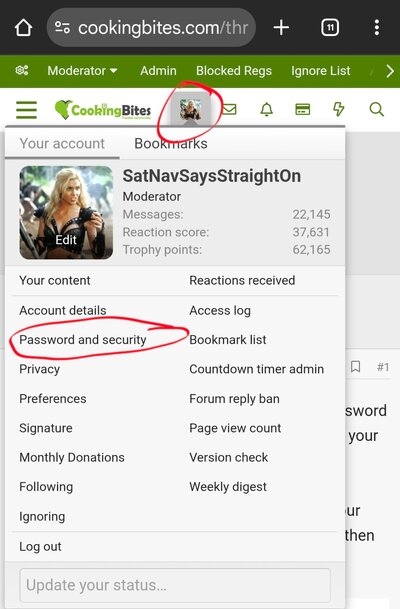
This is accessible from clicking on your member name in the top right hand corner and then selecting Password and security.
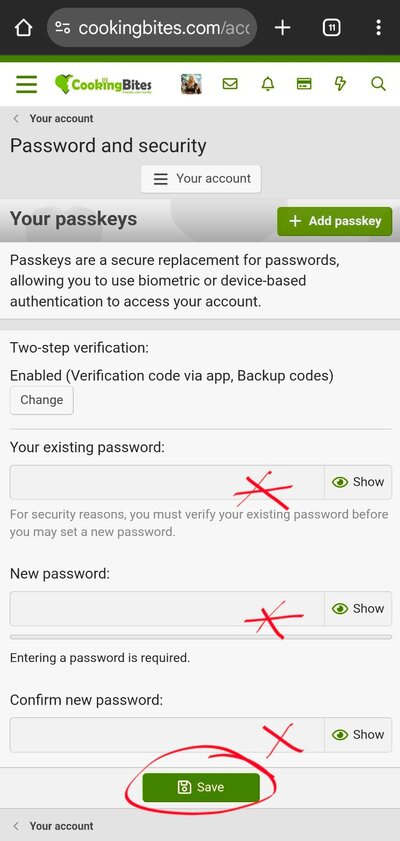
This will take you to a simple screen where there are 3 boxes.
Next time you try to post on CookingBites, it is going to require you to confirm your new password, so before you do anything else, I would recommend you use the Log Out option and then log back in with the new password to prevent you loosing any posts.
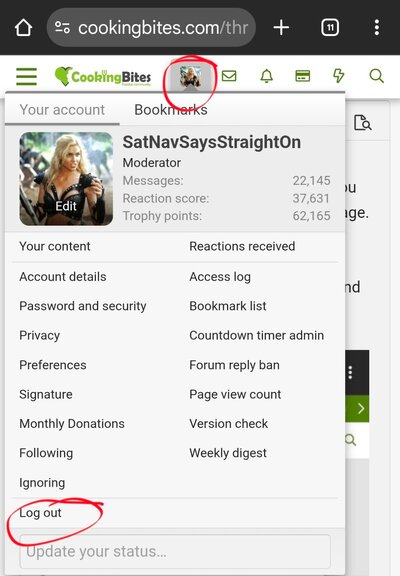
To Log out, simply click on your member name in the top right hand corner and select the bottom option, Log Out.
This is accessible from clicking on your member name in the top right hand corner and then selecting Password and security.
This will take you to a simple screen where there are 3 boxes.
- enter your old password, to confirm you are who you claim to be.
- enter the new password twice, to confirm you typed it in correctly
- click Save and your password will have been changed.
Next time you try to post on CookingBites, it is going to require you to confirm your new password, so before you do anything else, I would recommend you use the Log Out option and then log back in with the new password to prevent you loosing any posts.
To Log out, simply click on your member name in the top right hand corner and select the bottom option, Log Out.
Last edited: