

- Joined
- 11 Oct 2012
- Local time
- 11:11 AM
- Messages
- 22,314
- Location
- SE Australia
- Website
- www.satnavsaysstraighton.com
Sometimes you might want to reference a specific post in another thread rather than the thread.
There are two ways of doing this:
Option 1:

If you clicked the copy button, the link will now be in your clipboard. Paste it to the thread
It will look something like this.
This differs from a thread link in that it specifies not only the thread but also the post number (466701).
And the result is this: The CookingBites recipe challenge: chickpeas (garbanzo beans)
You will see a slightly different option after you click the share icon on a mobile device. The options presented will depend upon the type of device you are using (Android, Apple, Microsoft etc) and with Android in particular, it can vary with the device manufacturer as well.
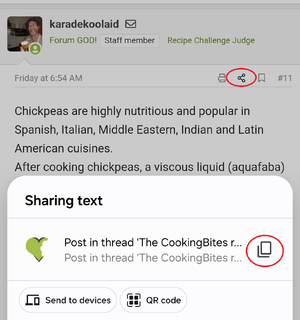
Once you have the address to the post in question, you'll need to link to it in the usual manner, but it is not always clear what the difference is between

It may be helpful to clarify in the post that the link points to a specific post in the thread. This is most easily done by adding a link and renaming it using the link button.

There are two ways of doing this:
Option 1:
- Click on the share icon in the top right-hand side of the post you want to reference
- Click the copy button/icon in the pop-up window that opens. It may be browser-specific, but typically it is as follows.
If you clicked the copy button, the link will now be in your clipboard. Paste it to the thread
It will look something like this.
Code:
https://www.cookingbites.com/threads/the-cookingbites-recipe-challenge-chickpeas-garbanzo-beans.31864/post-466701And the result is this: The CookingBites recipe challenge: chickpeas (garbanzo beans)
You will see a slightly different option after you click the share icon on a mobile device. The options presented will depend upon the type of device you are using (Android, Apple, Microsoft etc) and with Android in particular, it can vary with the device manufacturer as well.
Once you have the address to the post in question, you'll need to link to it in the usual manner, but it is not always clear what the difference is between
- The CookingBites recipe challenge: chickpeas (garbanzo beans)
- The CookingBites recipe challenge: chickpeas (garbanzo beans)
It may be helpful to clarify in the post that the link points to a specific post in the thread. This is most easily done by adding a link and renaming it using the link button.
- Post #11 in the Chickpea Challenge (compared to)
- The CookingBites recipe challenge: chickpeas (garbanzo beans)
Last edited:

