- Joined
- 11 Oct 2012
- Local time
- 9:00 PM
- Messages
- 22,641
- Location
- SE Australia
- Website
- www.satnavsaysstraighton.com
On a Desktop or Tablet
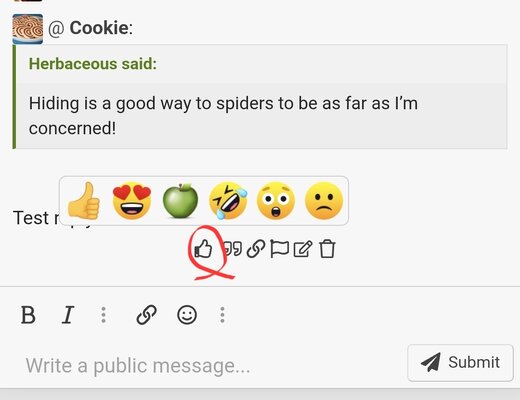
To Like/Love/Laugh
To add an emicon (like/love), hover over the "how many minutes ago" that message was posted.
The time will change to give you a few options. Click on the Thumbs Up icon and you will get the familiar options.

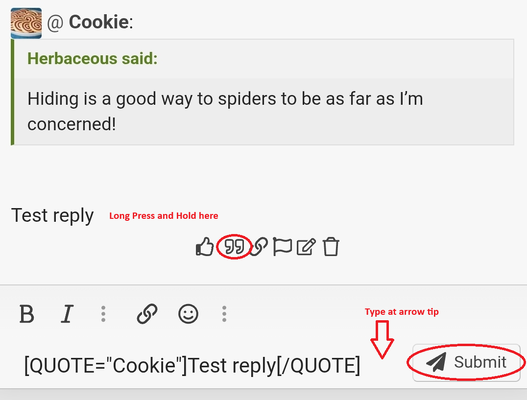
To Quote
To quote someone so they know you are replying to them, click the quotation marks next to the message posted x many minutes ago.

This will put the code into your message for you, like this
Type after it, or use shift+enter to start a line underneath it, write what you want, and press enter to post!

Press enter and you will see the message quoted as shown below.

To Like/Love/Laugh
To add an emicon (like/love), hover over the "how many minutes ago" that message was posted.
The time will change to give you a few options. Click on the Thumbs Up icon and you will get the familiar options.
To Quote
To quote someone so they know you are replying to them, click the quotation marks next to the message posted x many minutes ago.
This will put the code into your message for you, like this
Code:
[QUOTE="SatNavSaysStraightOn"]yes it is[/QUOTE]Type after it, or use shift+enter to start a line underneath it, write what you want, and press enter to post!
Press enter and you will see the message quoted as shown below.
Last edited: